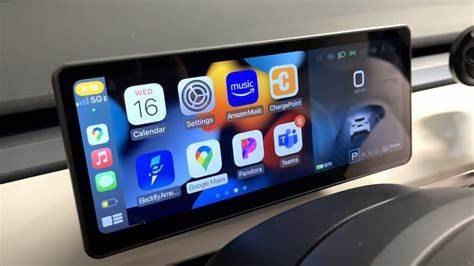
We will explore the topic of Tesla’s compatibility with Apple CarPlay and the available options for Tesla owners. Our discussion will highlight the unique features of Tesla’s infotainment system and examine various apps and services that enhance the functionality of these vehicles.
Whether we own a Tesla or are simply curious about the latest in-car technology, understanding how Apple CarPlay fits into the Tesla ecosystem is essential. Join us as we uncover the possibilities and limitations regarding this popular feature.
Reasons Tesla Doesn’t Feature Apple CarPlay
Tesla does not include Apple CarPlay in our vehicles for several key reasons.
1. Unique Infotainment System
We have developed the Tesla Infotainment System, which is designed specifically for our electric vehicles. This system is regularly updated to enhance the user experience, aligning with our innovative features and technology.
2. Focus on Native Apps
Instead of relying on third-party applications like Apple CarPlay, we prefer to maintain our own ecosystem. Our in-house applications, such as the Tesla app, allow users to control vehicle features, while Tesla Arcade offers a selection of in-car games for entertainment. This ensures a consistent experience tailored to our cars.
3. Connectivity Needs
While many iPhone users wish to access traditional features like Apple Music, iMessage, and Apple Maps, they can still connect their devices to our cars. Some believe that integrating CarPlay with Tesla’s system would enhance the experience, particularly when addressing user experience concerns.
4. Compatibility with Multiple Devices
Apple CarPlay relies heavily on iPhone functionalities, but our infotainment system is designed to work seamlessly with both iOS and Android devices. This flexibility allows us to create a more comprehensive experience that meets the diverse needs of our customers.
In this way, we strive to provide a superior infotainment option tailored to our innovative driving experience.
Compatibility guide on Tesla Apple CarPlay
When considering using Apple CarPlay with a Tesla, it’s important to know which devices work best. Here are some options that can enhance your Tesla’s infotainment system.
Carlinkit T2C Wireless Adapter
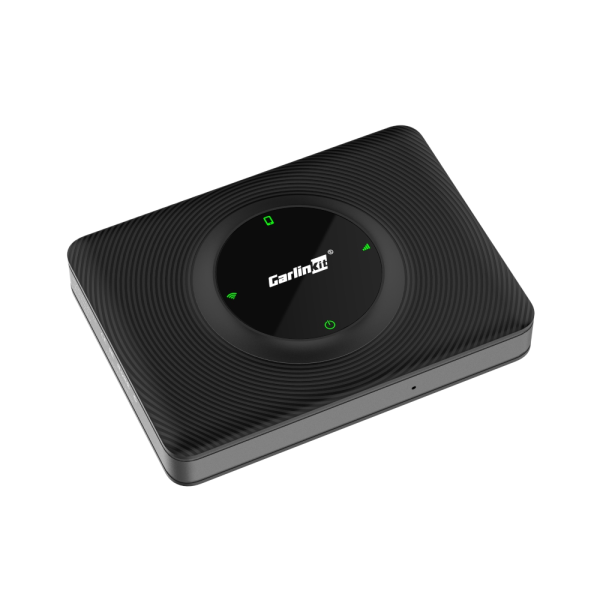
The Carlinkit T2C Wireless Adapter is designed to connect your smartphone wirelessly to your Tesla. It plugs directly into a USB port, allowing for a seamless Bluetooth connection with your mobile device. With this adapter, you can easily access your phone’s music, navigation, and other apps from your Tesla’s touchscreen.
Compatible iPhones:
- iPhone 15 series (15, 15 Plus, 15 Pro, 15 Pro Max)
- iPhone 14 series (14, 14 Plus, 14 Pro, 14 Pro Max)
- iPhone 13 series (13 Pro Max, 13 Pro, 13, 13 mini)
- iPhone SE
- iPhone 12 series (12 Pro Max, 12 Pro, 12 mini, 12)
- iPhone 11 series (11 Pro Max, 11 Pro, 11)
- iPhone X series (Xs Max, Xs, XR, X)
- iPhone 8 series (8, 8 Plus)
- iPhone 7 series (7, 7 Plus)
- iPhone 6s series (6s, 6s Plus, 6, 6 Plus)
- iPhone 5 series (5s, 5c, 5)
Supported iOS Versions:
- iOS 17
- iOS 16
- iOS 15
- iOS 14
- iOS 13
- iOS 12
- iOS 11
- iOS 10
Key Features:
- Wireless CarPlay connection, eliminating the need for cables
- Simple setup by connecting to the USB port
- Compatibility with both iOS and Android devices
- Voice control through Siri or Google Assistant
- Low latency for quick response
Carplay Raspberry Pi Wi-Fi Hotspot Web Server for Tesla
For those tech-savvy enthusiasts, using a Raspberry Pi to enable CarPlay in a Tesla is a creative solution. This method allows for the installation of a Wi-Fi network that the Tesla can connect to, enhancing the in-car experience.
Key Points:
- Basic Requirements: A Raspberry Pi Zero W can serve as a minimum option.
- Users will set up a peer-to-peer network for their Tesla, using the Raspberry Pi.
- A web server will be created on the Raspberry Pi to stream CarPlay video output using WebSocket technology.
- The Carlinkit adapter can retrieve the CarPlay video stream while the Tesla connects to the Raspberry Pi via Bluetooth for sound.
Installation Overview:
- Instructions for setup are available in dedicated documentation.
- Touchscreen simulation is required for controlling CarPlay through a browser.
- A 4G subscription may be needed, but it’s not obligatory for Tesla users; home Ethernet can also be used instead of a mobile network.
With these various options available, Tesla owners can choose the best method to enjoy Apple CarPlay, enhancing their driving experience.
FAQ related to Tesla CarPlay
Does Tesla support CarPlay?
Tesla does not include support for CarPlay in its vehicles. Instead, it uses its own built-in infotainment system. However, we can use third-party hardware like the Carlinkit T2C wireless adapter to access CarPlay.
Does Tesla plan to support CarPlay in the future?
Currently, there has been no official word from Tesla regarding future support for CarPlay. Tesla frequently updates its software and adds new features, so there’s a chance that CarPlay support could come later.
Can I use Siri while driving a Tesla?
Yes, we can activate Siri while driving a Tesla. To do this, we simply press and hold the voice command button located on the steering wheel.
What models can run CarPlay?
Since 2018, the Tesla models that have been produced to support CarPlay include the Model S, Model X, Model 3, and Model Y.
Can I connect my iPhone to a Tesla Model 3?
Absolutely, we can connect an iPhone to a Tesla Model 3 via Bluetooth. This allows us to stream music and make hands-free calls using the car’s speakers and microphone.
Frequently Asked Questions
Can Tesla vehicles use Apple CarPlay and is aftermarket installation an option?
We know that Tesla cars do not come with Apple CarPlay built-in. However, there are ways to add it through third-party products. Options for aftermarket installation include devices like Raspberry Pi systems or specific adapters designed for Tesla models. It’s important to consider the features and reliability of these solutions before getting one.
How can we add our Tesla key to the Apple Wallet?
Adding a Tesla key to the Apple Wallet is a straightforward process. First, we need to make sure our Tesla is compatible. Then, we can follow the steps in the Tesla app to add the key. Once linked, we can access our car using just our iPhones.
Are there any compatible aftermarket options for Apple Car Key in Tesla models?
Yes, there are some aftermarket solutions that allow us to use Apple Car Key with Tesla. Various manufacturers are developing systems to integrate the Apple Car Key feature into Tesla vehicles. We should research these options to ensure they meet our needs and are compatible with our specific model.
What is the cost to add Apple CarPlay to a vehicle after the initial purchase?
The costs for adding Apple CarPlay can vary widely based on the type of aftermarket device we choose. Generally, we may see prices ranging from $100 to several hundred dollars. Installation fees may also apply if we choose to have a professional do the work.
Which vehicles are expected to support the Apple Car Key feature in 2024?
As of 2024, many newer models from brands like BMW, Mercedes-Benz, and Ford are expected to support the Apple Car Key feature. We should check the specifications of each vehicle if this is an important feature for us.
Can we use the Apple Car Key with brands like Toyota and Volkswagen?
Currently, the Apple Car Key feature is not widely supported in brands such as Toyota and Volkswagen. While these brands are exploring new technology, we may need to look into their specific models for compatibility with Apple Car Key in the future.