Introduction|Why More Drivers Are Choosing Wireless CarPlay & Android Auto
Apple CarPlay and Android Auto have significantly transformed the driving experience, allowing easy access to navigation, music, calls, and messages directly from the car screen. However, in many vehicles, these systems still only work via wired connections, causing several daily inconveniences.
Main Drawbacks of Wired CarPlay / Android Auto
First, constantly plugging in a cable can quickly become cumbersome. Every trip requires taking out your phone, connecting the USB cable, and checking that the connection works. On short trips, this step often feels more troublesome than useful.
Additionally, cables often create visual clutter inside the car. Dangling wires, visible USB ports, and phones placed around the cabin make the interior less clean and comfortable.
Finally, repeated use of the USB port can cause premature wear on both the car and phone connectors. Over time, this may result in poor contact or unstable connections.
Wireless CarPlay and Android Auto adapters address these issues directly. Thanks to smart wireless connections, the experience becomes much smoother:
Automatic connection upon entering the vehicle
Faster and more responsive interface without cable handling
Cleaner and more organized car interior
For this reason, wireless CarPlay & Android Auto adapters are now considered a smart upgrade for modern vehicles.
What Makes a Good Wireless CarPlay & Android Auto Adapter?
Before choosing the best wireless CarPlay or Android Auto adapter, it’s important to understand the criteria that ensure a truly stable and fast experience.
Connection Stability (Wi-Fi + Bluetooth)
A high-quality adapter should use an optimized combination of Bluetooth and Wi-Fi to maintain a constant connection without interruptions or unexpected disconnects. Stability is the most important factor for comfortable daily use.
Speed and Low Latency
A good wireless adapter should provide responsiveness close to a wired system, especially for GPS navigation, music changes, or voice commands. Excessive latency directly reduces the driving experience.
Easy and Quick Installation
The ideal solution should be plug-and-play, with no need to disassemble the dashboard or perform complex settings. Users should be able to enjoy the system within minutes.
Retention of Original Functions
A quality adapter should retain all the vehicle’s original features:
Steering wheel controls
Original interface
Touchscreen and physical buttons
This is exactly what the Carlinkit solutions presented below provide.
Recommended Solution #1: Carlinkit 5.0 (2Air) — Stable and Fast Wireless Adapter
The Carlinkit 5.0 (2Air) is designed for drivers who want to convert their original wired CarPlay or Android Auto to wireless without altering the manufacturer experience.
Key Advantages
The adapter works in a simple yet effective way: it connects to the original system via USB and then establishes a wireless connection to the smartphone via Wi-Fi and Bluetooth.
Converts wired CarPlay / Android Auto to wireless
Immediate installation, no disassembly required
Stable and fast connection
Smooth responsiveness in daily use
Experience Close to Original
Carlinkit 5.0 retains the vehicle’s original interface and all existing controls. Users enjoy an experience nearly identical to the wired system, but with the convenience of wireless connectivity.
Who Is It For?
Drivers who only want wireless CarPlay or Android Auto
Users seeking simplicity, stability, and reliability
Those who don’t want to modify the original multimedia system
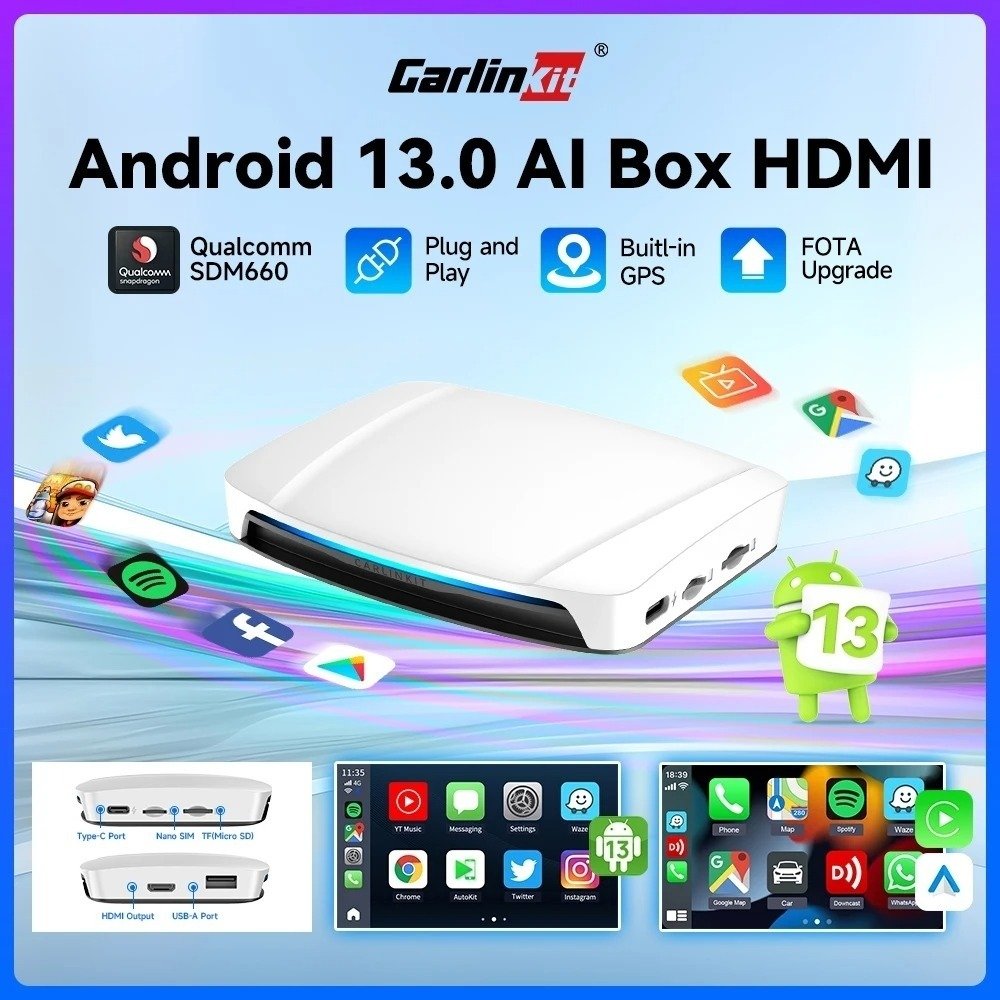
For users who want more than just wireless CarPlay or Android Auto, the Carlinkit Android 13 AIBOX UHD 660 offers a completely different and advanced approach.
Standalone Android Box
This model includes a full Android 13 system while supporting wireless CarPlay and Android Auto. It transforms the vehicle’s original screen into a smart multimedia hub.
Performance and Storage
8 GB RAM
128 GB internal storage
Expandable via memory card
These specifications ensure smooth performance even with multiple active apps.
Entertainment and Connectivity
The box allows installation of various entertainment apps and provides HDMI output, ideal for an external screen or rear-seat entertainment system.
Who Is It For?
Drivers who want more freedom than standard CarPlay
Families or multiple users in the same vehicle
Those seeking an advanced in-car multimedia experience
How to Choose Between the Two Solutions
The choice mainly depends on your needs and how you use your vehicle.
Choose Carlinkit 5.0 (2Air) if:
You prioritize stability and speed
You want an experience close to the original system
You want a simple solution with no complex setup
Choose Carlinkit Android 13 AIBOX UHD 660 if:
You want a more open and customizable system
You use multiple multimedia apps
You want to turn your car screen into a full Android platform
Exclusive Advantages of the Official Store
Purchasing from the official store offers more than just the product.
Exclusive Services After Order
Manual verification of vehicle compatibility
Lifetime access to official firmware and test permissions
2-year manufacturer warranty, extendable to 3 years
1:1 real-time technical support
These benefits are only available for orders made through the official website.
Warranty and Shipping
To ensure a risk-free purchase:
30-day money-back guarantee
Free worldwide shipping
This allows you to try the product with peace of mind.
Important Compatibility Information
Before purchasing, make sure your vehicle is compatible:
Not compatible with Tesla and BMW vehicles
Only compatible with vehicles equipped with factory-wired CarPlay or Android Auto
Pre-checking prevents incorrect purchases and ensures an optimal experience.
Conclusion|Which Wireless CarPlay & Android Auto Is Best for You?
The best wireless CarPlay & Android Auto adapter depends on your expectations:
Carlinkit 5.0 (2Air): Ideal for drivers seeking stable, fast connectivity close to the original system
Carlinkit Android 13 AIBOX UHD 660: Perfect for those wanting advanced and expandable multimedia functionality
With reliable wireless connection, exclusive official services, and strong warranties, both solutions meet the needs of modern drivers. Now you just need to choose the one that best fits your daily use.