
What Is Wireless Aftermarket CarPlay and How Does It Work?
Apple CarPlay has become one of the most useful in-car technologies, allowing drivers to access navigation, music, calls, and messages directly from their vehicle’s screen.
However, many cars either do not support Apple CarPlay or only support a wired connection. Wireless aftermarket CarPlay devices provide an easy way to upgrade a vehicle without replacing the factory infotainment system.
In this guide, we explain what wireless aftermarket CarPlay is, how it works, and which devices can help you add wireless CarPlay to your car.
What Is Wireless Aftermarket CarPlay?
Wireless aftermarket CarPlay refers to third-party devices that enable Apple CarPlay connectivity in vehicles that do not support it natively or only support wired CarPlay.
These devices allow drivers to connect their iPhone to the car’s infotainment system wirelessly using Bluetooth and Wi-Fi.
- Wireless CarPlay adapters
- CarPlay AI boxes
- Portable CarPlay displays
How Wireless CarPlay Works
Bluetooth Pairing
The adapter first connects to the iPhone through Bluetooth to establish the connection.
Wi-Fi Data Transfer
After pairing, the system switches to Wi-Fi to transmit navigation data, music, messages, and app information.
CarPlay Interface Display
The Apple CarPlay interface then appears on the car’s screen or a portable display.
Recommended Wireless CarPlay Devices
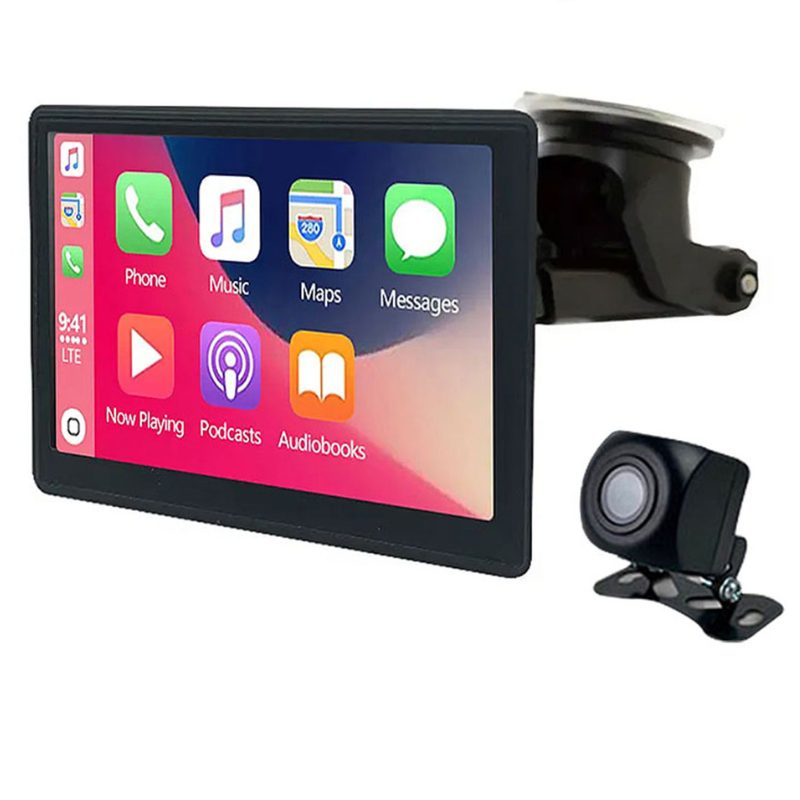
This portable CarPlay display allows drivers to add Apple CarPlay to almost any vehicle. The device mounts on the dashboard and connects wirelessly to an iPhone.
It also includes a reversing camera that activates automatically when the vehicle shifts into reverse.
- Works with almost any car
- Wireless CarPlay connection
- Includes reversing camera
- Easy installation
- Smaller screen than built-in systems
- Requires dashboard mounting

The Carlinkit 4.0 adapter converts factory wired CarPlay or Android Auto systems into wireless connections.
Simply plug the adapter into the car’s USB port and pair your phone. The device will reconnect automatically every time you start the car.
- Converts wired CarPlay to wireless
- Supports Android Auto
- Plug and play installation
- Compact design
- Requires factory wired CarPlay
- Slight delay in some vehicles

The Carlinkit 5.0 2air is a newer generation wireless adapter designed to improve connection speed and stability.
It supports both Apple CarPlay and Android Auto and uses a faster 5.8GHz Wi-Fi connection for smoother performance.
- Faster connection speed
- Supports CarPlay and Android Auto
- Stable wireless connection
- OTA firmware updates
- Requires wired CarPlay compatibility
- Not compatible with very old vehicles
Wireless CarPlay vs Wired CarPlay
| Feature | Wireless CarPlay | Wired CarPlay |
|---|---|---|
| Connection | Bluetooth + WiFi | USB Cable |
| Convenience | Automatic connection | Manual connection |
| Charging | No charging | Charges phone |
| Installation | Plug and play adapters | Factory system |
Final Thoughts
Wireless aftermarket CarPlay devices provide an easy way to upgrade a vehicle’s infotainment system. Whether you use a wireless adapter, AI box, or portable display, these solutions allow drivers to enjoy modern smartphone connectivity without replacing the entire stereo system.
For drivers who already have wired CarPlay, adapters like the Carlinkit 4.0 or Carlinkit 5.0 provide one of the simplest wireless upgrades available today.