Introduction: Why More Drivers Are Switching from Wired to Wireless CarPlay
Apple CarPlay and Android Auto have become indispensable features for many drivers, forming an important part of the daily driving experience. The car’s infotainment system easily integrates navigation, music streaming, calls, and messaging. However, cables remain a common frustration for many users.
With older wired CarPlay or Android Auto, drivers must connect their phone every time they enter the car. Over time, cables wear out, connections loosen, and dashboards become cluttered with wires. Frequent plugging and unplugging can also damage the charging port on your phone, adding more inconvenience.
This is why wireless CarPlay adapters have quickly gained popularity. These compact devices allow you to switch wired CarPlay or Android Auto to wireless without replacing the factory head unit or modifying the car. Installation is simple, and once set up, the system automatically connects whenever you start the car.
In this article, we will compare two popular solutions from Carlinkit: Carlinkit 5.0 (2Air) and Carlinkit Tbox Ultra 2. Both support wireless CarPlay, but they are aimed at different user profiles. After reading this guide, you will clearly understand which adapter best suits your car, driving style, and needs.
What Is a Wired to Wireless CarPlay Adapter?
A wired to wireless CarPlay adapter is a small device that connects to your car’s existing USB port, the one you already use for wired CarPlay or Android Auto. The adapter establishes a wireless connection between your smartphone and your vehicle’s infotainment system via Bluetooth and Wi-Fi, eliminating the need for a physical cable.
Important requirement: Adapters only work with vehicles that already have factory-installed wired Apple CarPlay or Android Auto.
They cannot add CarPlay or Android Auto to cars that never had it. A wired-to-wireless adapter will not work in cars without factory wired CarPlay or Android Auto.
Once connected, setup takes only a few minutes. After the initial pairing, your phone automatically connects whenever you start the car, providing a completely wireless experience without daily setup.
Carlinkit 5.0 (2Air) is designed with one clear goal: To convert factory wired CarPlay or Android Auto into a stable wireless experience.
The adapter focuses on simplicity and reliability. It resembles the existing CarPlay or Android Auto interface but without the cable. Once installed, the system automatically connects, giving immediate access to navigation, music, calls, and messages when you enter the car.
Key features of Carlinkit 5.0 (2Air):
Wireless Apple CarPlay support
Wireless Android Auto support
Plug-and-play via USB
Lightweight and compact design
Ideal for everyday driving convenience
This model is perfect for drivers satisfied with their factory infotainment system but wanting to remove cable clutter.
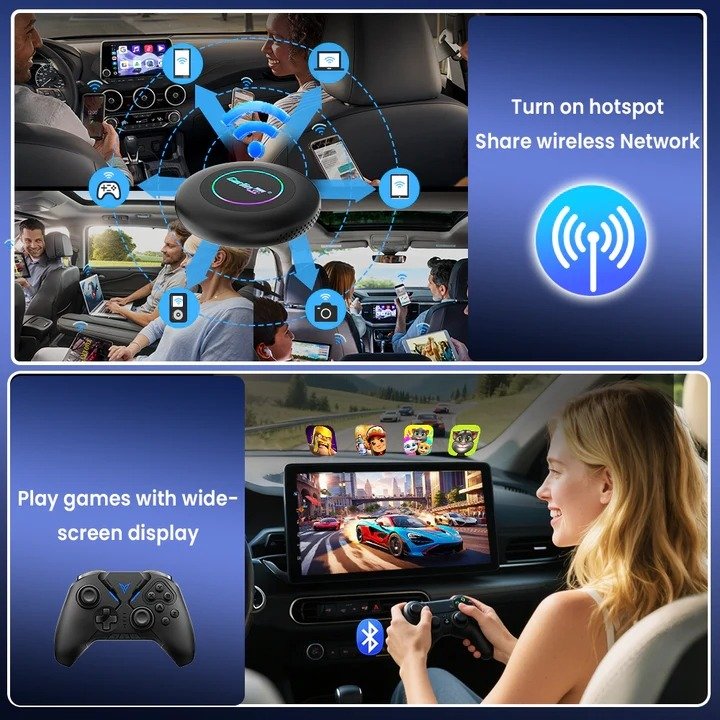
Carlinkit Tbox Ultra 2 takes wireless CarPlay to a whole new level. In addition to wireless CarPlay and Android Auto, it has a built-in Android 15 operating system.
The Tbox Ultra 2 doesn’t just make your car screen a bridge; it transforms it into an Android-based smart display. It allows you to run Android apps directly on the dashboard without relying on your phone interface.
Key features of Carlinkit Tbox Ultra 2:
Wireless Apple CarPlay and Android Auto
Built-in Android 15 operating system
Powerful hardware with ample RAM and storage
Support for Android apps
Split-screen multitasking
Built-in 4G SIM support for independent internet access
Tbox Ultra 2 is an all-in-one smart in-car upgrade designed for drivers seeking more functionality, freedom, and an advanced infotainment experience.
Feature Comparison: Carlinkit 5.0 vs Tbox Ultra 2
When comparing these two adapters, it’s important to look beyond specifications and focus on real-world driving scenarios.
Both devices support:
Wireless Apple CarPlay
Wireless Android Auto
However, the differences become clear when looking at how they are used.
Carlinkit 5.0 (2Air) is simply a cable replacement. It provides the same interface, same apps, and same controls — just wireless. It is stable and user-friendly, ideal for daily commutes and long drives.
Tbox Ultra 2 offers additional functionality. With its built-in Android system, phone mirroring is no longer a limitation. You can run Android apps directly, use split-screen multitasking, and access the internet with a 4G SIM without relying on your phone.
In practical terms:
Carlinkit 5.0 feels like a seamless upgrade of what you already have.
Tbox Ultra 2 feels like a full transformation of your infotainment system.
Installation and Daily Use
Installation Process
Both adapters follow the same basic principle:
Plug the device into the factory USB port
Complete the initial pairing process
Enjoy automatic wireless connection afterward
No modifications are required, and installation is fully reversible. Once installed, the system links automatically every time the car starts, making it easy for daily use.
Driving Experience
Carlinkit 5.0 (2Air) provides an immediately familiar experience. The wireless connection is stable, and original vehicle controls, including touchscreen and steering wheel buttons, work as usual. No learning curve is required.
Tbox Ultra 2 offers a more interactive experience. In addition to wireless CarPlay, you can switch to the Android interface, run apps, and use split-screen mode. This makes the infotainment system more dynamic, especially for drivers who spend a lot of time in their cars.
Which Adapter Fits Your Car and Needs?
Choose Carlinkit 5.0 (2Air) If:
You already like your factory CarPlay/Android Auto interface
You just want to remove the cable
You prefer a lightweight, straightforward solution
You want an affordable wireless upgrade
Ideal for drivers who value simplicity and reliability over extra features.
Choose Tbox Ultra 2 If:
You want more than just CarPlay or Android Auto
You plan to use Android apps directly on your car screen
You value higher performance, storage, and multitasking
You want built-in 4G connectivity without relying on your phone
Perfect for drivers who want a smarter, more powerful in-car system.
Compatibility & Important Notes
Before purchasing, compatibility must be clearly understood:
Both adapters only work with vehicles that have factory wired Apple CarPlay or Android Auto
Not compatible with Tesla or BMW vehicles
Compatibility may vary by vehicle model and year
Checking compatibility before purchase is strongly recommended.
Exclusive Benefits When Ordering from Our Official Website
Customers ordering from our official website receive exclusive benefits:
Manual vehicle compatibility verification after order
Lifetime access to official firmware updates and testing permissions
Both deliver stable wireless CarPlay but serve different needs. Choose based on whether you want simplicity or advanced functionality.
Call to Action
Check your vehicle’s compatibility before ordering to ensure the best experience. To unlock exclusive benefits, lifetime firmware access, and professional technical support, purchase directly from our official website.
Upgrade your drive with the right wireless CarPlay solution — and enjoy a cleaner, smarter, cable-free journey.