If you love enjoying videos on the go, your car’s multimedia system may be missing a crucial feature: video streaming. Many modern vehicles come equipped with wired CarPlay or Android Auto, allowing easy access to navigation, music, and phone apps. However, these systems often fall short when it comes to one major demand: watching your favorite streaming services, like Netflix or YouTube, directly on your car’s screen.
What if you could transform your existing wired CarPlay or Android Auto into a full in-car entertainment hub? With the Carlinkit CarPlay AI TV Box, this is now possible. This innovative device enables high-definition video streaming in your vehicle, adding a whole new level of entertainment to your drives. In this article, we’ll explain how the Carlinkit AI TV Box works, its benefits, and how to set it up to turn your OEM wired CarPlay into a complete multimedia experience.
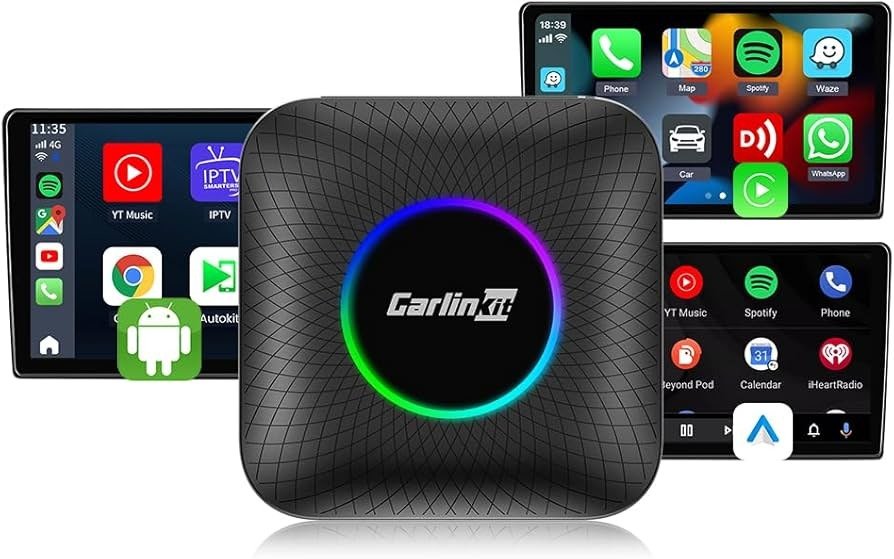
Carlinkit CarPlay AI TV Box Introduction
The Carlinkit CarPlay AI TV Box is a powerful multimedia device designed to upgrade your wired CarPlay or Android Auto system. It delivers smooth streaming, improved performance, and a sleek, stylish look that enhances your car’s interior.
Key features include:
- Android 13: Upgrades your car’s infotainment system into a full streaming media platform, allowing you to watch YouTube and other streaming apps directly on your car’s screen.
- Chipset: Powered by the Qualcomm 6225, this device offers smooth operation and high-performance processing. It switches between apps seamlessly and streams high-definition videos without lag.
- Dual Memory Support: Available in 4GB RAM + 64GB storage or 8GB RAM + 128GB storage, providing plenty of space for apps, media, and video streaming. You can choose the configuration that best suits your needs.
- LED Ambient Lighting: Adds ambient LED lighting to your car’s interior. This personalized feature enhances both the aesthetic and the entertainment experience, especially during nighttime drives.
Note: This device requires a factory-installed wired CarPlay or Android Auto system, ensuring seamless integration without modifying your original infotainment setup.
Things to Know Before Using the Carlinkit AI TV Box
Before investing, consider the following:
- Compatibility Check: Confirm your vehicle has a wired CarPlay or Android Auto system. Carlinkit relies on your existing wired system to function.
- Not Compatible with BMW or Tesla: The Carlinkit AI TV Box is currently incompatible with BMW and Tesla vehicles due to differences in system architecture, preventing seamless integration.
Ensuring your vehicle meets these requirements is the first step toward a successful multimedia upgrade.
How the Carlinkit AI TV Box Works
The Carlinkit AI TV Box is easy to use and operates instantly. Here’s how it works:
- Plug-and-Play: Installation is straightforward. Simply connect the device to your wired CarPlay or Android Auto system, and it becomes an integrated part of your infotainment screen. No technical expertise required.
- Wireless CarPlay & Android Auto: Converts your wired system into a wireless one. Your smartphone connects via Wi-Fi, eliminating cable clutter and allowing hands-free operation.
- Streaming Support: Once connected, you can enjoy popular streaming services directly on your car’s display:
- Netflix: Access films, TV shows, and documentaries during long drives or when idle.
- YouTube: Watch videos, music content, tutorials, and educational content, expanding your in-car entertainment beyond music and navigation.
- Netflix: Access films, TV shows, and documentaries during long drives or when idle.
The Carlinkit AI TV Box transforms your OEM wired CarPlay into a full-featured multimedia system suitable for passengers of all ages.
Advantages of a Multimedia Box in Your Car
Installing a multimedia box provides several benefits:
- Entertainment on the Go: Netflix and YouTube support keeps passengers engaged during long trips, on the road, or even when parked. Say goodbye to bored children and impatient passengers.
- Immersive Lighting: LED ambient lighting creates a more immersive interior, enhancing the movie or video-watching experience with a personalized touch.
- Customizable Memory: Choose between 4GB RAM + 64GB storage or 8GB RAM + 128GB storage to meet your media needs. Increased storage allows offline access to apps and videos.
- Future-Proof: With Android 13, the Carlinkit AI TV Box receives the latest features and security updates, ensuring consistent performance and longevity for your multimedia setup.
Installation Guide: Step-by-Step
Installing the Carlinkit AI TV Box is simple:
- Plug the Device: Connect the AI TV Box to your car’s wired CarPlay or Android Auto USB port.
- Power On: Activate your car’s infotainment system. The device will initialize automatically.
- Connect Your Phone: Follow the on-screen instructions to connect your smartphone wirelessly.
- Start Streaming: Launch Netflix or YouTube on your car screen and begin streaming.
No professional installer or complicated wiring is required to turn your existing system into a complete in-car entertainment setup.
The Ultimate Backseat Entertainment Solution
The Carlinkit AI TV Box is perfect for families and passengers:
- Family-Friendly: Kids and other passengers can watch movies or shows while traveling, easing the driver’s workload and enhancing the overall travel experience.
- Driver Safety: Video streaming should always be used responsibly to ensure driver safety.
Why Choose Carlinkit for Upgrading Your Car Entertainment?
- Quality & Performance: Qualcomm 6225 chipset ensures high-quality, lag-free streaming even during extended use.
- Plug-and-Play Installation: Start streaming immediately by plugging into your existing wired CarPlay or Android Auto system.
- Affordable Solution: Enjoy in-car streaming without purchasing a new vehicle or spending heavily on multimedia upgrades.
Conclusion
The Carlinkit CarPlay AI TV Box provides a seamless solution to upgrade your car’s infotainment system. It transforms your OEM wired CarPlay or Android Auto into a full in-car multimedia experience with support for Netflix, YouTube, and other streaming platforms. Combined with ambient LED lighting and flexible storage options, it delivers entertainment, style, and convenience, elevating your driving experience.
Check your vehicle’s compatibility today and take the first step toward a fully upgraded in-car entertainment system.